Contrast ratio: This is quite simply how black the blacks are and how white the whites are. So the higher the ratio the better the image. 1:500 no thanks, 1:3,000 yes please.
Now for a bit of personal knowledge. I have no idea wat ATSC means but QAM is Quadrature Amplitude Modulation, considered to be a very bandwidth efficient technique for modulation of signals. Really good but requiring high power to transmit the signals. They provide signals wich have very low error rate of reception. Well guess it wasnt a waste doin ECE. At least im pretty good on the communication front.
Showing posts with label Technology. Show all posts
Showing posts with label Technology. Show all posts
Thursday, August 28, 2008

Friday, August 22, 2008
Do u no wat HDTV means?
Have u wondered abt HDTV? Now wat is that if u ask do skip this post. But for the record I'll tell u that it means High Density TeleVision. For those who keep getting bombarded with ads about HDTV. Have u tried goin to a store wich sells these. You may find that the clerks really don't know much about them. And tho u some across one that looks interesting, u mite find description is nothing if not confusing. For example: Consider a 42-inch HD LCD set where the specifications say "a resolution of 1,920x1,080. It is compatible with 480i, 480p, 720p, 1080i, and 1080p ". Now wat does the i and p mean? Let alone the other numbers. It is said to be compatible to NTSC (recognize that ??), ATSC, and QAM (now there we go !!) And what is Media Connectivity?
Hmmm...I understand. So i'll let u no things as far as i hav read abt the above. I shud thank cnet for all these info.
Ok, lets start with the resolutions/outputs. 480i, 480p, 720p, 1080i, and 1080p all refer to the second half (the smaller number) of the resolution, so both 1080i and 1080p would display the resolution 1,920x1,080. Now for P. vs. I. P stands for progressive and I for Interlaced. With I, the image is made up of horizontal lines, these lines are then dived by two (every other, not top and bottom) and the information for these lines is spread over two frames of the video. This saves on storage space, and makes it easier on broadcasting companies, but with decoding of the interlaced video or fast moving scenes you'll see the horizontal lines.Progressive scan on the other hand, each frame has a complete image which it displays, this more powerful hardware to display it without stutters and requires a lot more storage space, but the image is always good.
Compatibility: NTSC refers to a technological format used by the US TV broadcaster i.e. in the UK our TV is broadcast in PAL. NTSC, is fine if one is from the USA. One need not worry about the others because everything you play will be encoded in NTSC. This is also the same for anything 'recorded' in these countries e.g. if you recorded some tv at home in the US then took the vhs tape with you to some freinds or relatives in the UK or japan it would NOT display properly if at all in their VCR, and also if you brought a vcr and/or tv with you from the USA that also would not work even if you had an adaptor for the different electrical plug that the US uses.
Media Connectivity: is quite simply a word used to say the input jacks on the rear and side or front panels. Nowadays with HDTV's there’s a lot more connections to think about. There’s you old S-Video and RGB, these are fine for standard definition video. However for HD video you'll need to use, HDMI, Component, (VGA, DVI these two are PC connectors). HDMI is one large plug (much smaller than Scart though) this will provide the best in video quality allowing you to watch in full 1080p with any interference as it is digital. Component has 5 jacks, 2 for sound and 3 for the image, but as the signal is apologue you may pick up interference.And now for one other thing you may need to know.
Contrast ratio: This is quite simply how black the blacks are and how white the whites are. So the higher the ratio the better the image. 1:500 no thanks, 1:3,000 yes please.
Now for a bit of personal knowledge. I have no idea wat ATSC means but QAM is Quadrature Amplitude Modulation, considered to be a very bandwidth efficient technique for modulation of signals. Really good but requiring high power to transmit the signals. They provide signals wich have very low error rate of reception. Well guess it wasnt a waste doin ECE. At least im pretty good on the communication front.
Hmmm...I understand. So i'll let u no things as far as i hav read abt the above. I shud thank cnet for all these info.
Ok, lets start with the resolutions/outputs. 480i, 480p, 720p, 1080i, and 1080p all refer to the second half (the smaller number) of the resolution, so both 1080i and 1080p would display the resolution 1,920x1,080. Now for P. vs. I. P stands for progressive and I for Interlaced. With I, the image is made up of horizontal lines, these lines are then dived by two (every other, not top and bottom) and the information for these lines is spread over two frames of the video. This saves on storage space, and makes it easier on broadcasting companies, but with decoding of the interlaced video or fast moving scenes you'll see the horizontal lines.Progressive scan on the other hand, each frame has a complete image which it displays, this more powerful hardware to display it without stutters and requires a lot more storage space, but the image is always good.
Compatibility: NTSC refers to a technological format used by the US TV broadcaster i.e. in the UK our TV is broadcast in PAL. NTSC, is fine if one is from the USA. One need not worry about the others because everything you play will be encoded in NTSC. This is also the same for anything 'recorded' in these countries e.g. if you recorded some tv at home in the US then took the vhs tape with you to some freinds or relatives in the UK or japan it would NOT display properly if at all in their VCR, and also if you brought a vcr and/or tv with you from the USA that also would not work even if you had an adaptor for the different electrical plug that the US uses.
Media Connectivity: is quite simply a word used to say the input jacks on the rear and side or front panels. Nowadays with HDTV's there’s a lot more connections to think about. There’s you old S-Video and RGB, these are fine for standard definition video. However for HD video you'll need to use, HDMI, Component, (VGA, DVI these two are PC connectors). HDMI is one large plug (much smaller than Scart though) this will provide the best in video quality allowing you to watch in full 1080p with any interference as it is digital. Component has 5 jacks, 2 for sound and 3 for the image, but as the signal is apologue you may pick up interference.And now for one other thing you may need to know.
Contrast ratio: This is quite simply how black the blacks are and how white the whites are. So the higher the ratio the better the image. 1:500 no thanks, 1:3,000 yes please.
Now for a bit of personal knowledge. I have no idea wat ATSC means but QAM is Quadrature Amplitude Modulation, considered to be a very bandwidth efficient technique for modulation of signals. Really good but requiring high power to transmit the signals. They provide signals wich have very low error rate of reception. Well guess it wasnt a waste doin ECE. At least im pretty good on the communication front.
Tuesday, July 29, 2008
WiMAX
WiMAX, the Worldwide Interoperability for Microwave Access, is a telecommunications technology aimed at providing wireless data over long distances from point-to-point links to full mobile cellular type access. It is based on the IEEE 802.16 standard, which is also called WirelessMAN which stands for Metropolitan Area Network. The name "WiMAX" was created by the WiMAX Forum, which was formed in June 2001 to promote conformance and interoperability of the standard. It was devised to provide wireless broadband access as an alternative to cable and DSL. The standard of Wi MAX is 802.16-2004, which can cover upto 50 Kms radius service area and high data rate upto 70 Mbps in the freq range.
The variations can be noted as below:
802.16-2004 is often called 802.16d, since that was the working party that developed the standard. It is also frequently referred to as "fixed WiMAX" since it has no support for mobility.
802.16e-2005 is an amendment to 802.16-2004 and is often referred to in shortened form as 802.16e. It introduced support for mobility, amongst other things and is therefore also frequently called "mobile WiMAX".
It has wide variety of applications contributed by its wide area coverage and high data rates. These range as follows:
*Services like POTs, Leased lines with G.703, VOIP, Ethernet can be extended.
* connecting the Wi Fi Hot Spots to the internet as back bone.
*Data bandwidth Management features like CIR, PIR & Best effort are supported.
And the places wer it has already shown its effect. Remember the tsunami in December 2004.
WiMAX access was used to assist with communications in Aceh, Indonesia, after all communication infrastructure in the area, other than Ham Radio, was destroyed, making the survivors unable to communicate with people outside the disaster area and vice versa. WiMAX provided broadband access that helped regenerate communication to and from Aceh.
There is no uniform global licensed spectrum for WiMAX, although the WiMAX Forum has published three licensed spectrum profiles: 2.3 GHz, 2.5 GHz and 3.5 GHz, in an effort to decrease cost: economies of scale dictate that the more WiMAX embedded devices (such as mobile phones and WiMAX-embedded laptops) are produced, the lower the unit cost.
The disadvanage-well all coins hav 2 sides. So here goes...A commonly-held misconception is that WiMAX will deliver 70 Mbit/s over 50 kilometers. In reality, WiMAX can do one or the other — operating over maximum range (50 km) increases bit error rate and thus must use a lower bitrate. Lowering the range allows a device to operate at higher bitrates.
So as it can be seen. WiMAX is an emerging technology tho not much in deployment in India will soon cover the entire globe and be an imp part of our mobile systems in a way much similar to Wi-fi now.
The variations can be noted as below:
802.16-2004 is often called 802.16d, since that was the working party that developed the standard. It is also frequently referred to as "fixed WiMAX" since it has no support for mobility.
802.16e-2005 is an amendment to 802.16-2004 and is often referred to in shortened form as 802.16e. It introduced support for mobility, amongst other things and is therefore also frequently called "mobile WiMAX".
It has wide variety of applications contributed by its wide area coverage and high data rates. These range as follows:
*Services like POTs, Leased lines with G.703, VOIP, Ethernet can be extended.
* connecting the Wi Fi Hot Spots to the internet as back bone.
*Data bandwidth Management features like CIR, PIR & Best effort are supported.
And the places wer it has already shown its effect. Remember the tsunami in December 2004.
WiMAX access was used to assist with communications in Aceh, Indonesia, after all communication infrastructure in the area, other than Ham Radio, was destroyed, making the survivors unable to communicate with people outside the disaster area and vice versa. WiMAX provided broadband access that helped regenerate communication to and from Aceh.
There is no uniform global licensed spectrum for WiMAX, although the WiMAX Forum has published three licensed spectrum profiles: 2.3 GHz, 2.5 GHz and 3.5 GHz, in an effort to decrease cost: economies of scale dictate that the more WiMAX embedded devices (such as mobile phones and WiMAX-embedded laptops) are produced, the lower the unit cost.
The disadvanage-well all coins hav 2 sides. So here goes...A commonly-held misconception is that WiMAX will deliver 70 Mbit/s over 50 kilometers. In reality, WiMAX can do one or the other — operating over maximum range (50 km) increases bit error rate and thus must use a lower bitrate. Lowering the range allows a device to operate at higher bitrates.
So as it can be seen. WiMAX is an emerging technology tho not much in deployment in India will soon cover the entire globe and be an imp part of our mobile systems in a way much similar to Wi-fi now.
Thursday, June 26, 2008
Laptop recommendation for children
With every single person rushing on to become computer savvy, it is a simple problem faced by all parents who see heir kids pestering them to get a laptop all for their own. When any parent finally decides on giving their kids one they are suck with which one is more efficient. And for help they end up asking people who in turn question them on why they want to purchase laptops for kids so young. Sure, it might sound like a large investment for their age, but mobility is the driver behind the decision especially when people travel a lot.
Putting aside the moral and financial issues revolving around giving computers to children, selecting a laptop computer for anyone of any age can be a difficult task. You can see laptops advertised for as little as $400 (after rebates) to as high as $3000 and more. It is tempting to take the cheap approach, thinking that if they ruin it in a few weeks then you are out only $400 vs. $2000. However, as soon as you mention the word GAMING, it can change the entire scenario depending on the type of game. It would be similar to walking into a car dealer and asking for a car that gets ok mileage, can keep up with traffic on the expressway, is easy to park and primarily used to commute to work… and then adding, I would also like to take it to the track on weekends and race it. The big question is what kind of GAMING. There is one level of gaming like Solitaire, Scrabble and Free Cell which any computer can play and then there are the high end games such as Counter Strike, F.E.A.R and Quake, which can require higher end computers with faster processors, more memory and better video cards. If your children start getting into the higher end games, the type of computer you choose can make a big difference in what they can do and how fast they can do it. Playing some of these games is one thing but actually competing is another.
If you start with the basic laptop for about $500 you typically get a 14.1 or 15.4” screen, low end processor (Celeron or equiv), 1 gig of ram, mid to small mechanical hard drive, Windows Vista Basic and a total weight of about 6 lbs. Now that you have this basic $500 laptop the price starts to increase as you start changing the size and quality of the screen, the overall weight, battery life and the individual components such as Processor, Memory, Video Processor and hard drive. You generally pay extra for either smaller lighter weight models as well as larger screen models. So go ahead and select the best, you will see that laptops are the best investment as of date.
Putting aside the moral and financial issues revolving around giving computers to children, selecting a laptop computer for anyone of any age can be a difficult task. You can see laptops advertised for as little as $400 (after rebates) to as high as $3000 and more. It is tempting to take the cheap approach, thinking that if they ruin it in a few weeks then you are out only $400 vs. $2000. However, as soon as you mention the word GAMING, it can change the entire scenario depending on the type of game. It would be similar to walking into a car dealer and asking for a car that gets ok mileage, can keep up with traffic on the expressway, is easy to park and primarily used to commute to work… and then adding, I would also like to take it to the track on weekends and race it. The big question is what kind of GAMING. There is one level of gaming like Solitaire, Scrabble and Free Cell which any computer can play and then there are the high end games such as Counter Strike, F.E.A.R and Quake, which can require higher end computers with faster processors, more memory and better video cards. If your children start getting into the higher end games, the type of computer you choose can make a big difference in what they can do and how fast they can do it. Playing some of these games is one thing but actually competing is another.
If you start with the basic laptop for about $500 you typically get a 14.1 or 15.4” screen, low end processor (Celeron or equiv), 1 gig of ram, mid to small mechanical hard drive, Windows Vista Basic and a total weight of about 6 lbs. Now that you have this basic $500 laptop the price starts to increase as you start changing the size and quality of the screen, the overall weight, battery life and the individual components such as Processor, Memory, Video Processor and hard drive. You generally pay extra for either smaller lighter weight models as well as larger screen models. So go ahead and select the best, you will see that laptops are the best investment as of date.
Sunday, May 11, 2008
India 'inside ' many smart phones
Remember the time wen personal computers came with the logo 'Intel inside' ? Well maybe its time we imagine another one wich says 'India inside'- a catchline for many of the world's 250 million smart phones expected to sell during 2008. Mobile phones are said to be smart wen they can access the Internet and provide a host of Web-driven voice, data and video services. Now it has been shown that some of the most popular applications world-wide on the S60 software platform, created by the leading manufacturer, Nokia, are the result of Indian ingenuity.
----->'Mundu IM' created by MUmbai-based Geodesic allows users to seamlessly move from phone to PC and back
----->'Smart Assistant Live' created by Gurgaon-based Aims Migital which turns the phone into personal assistant. 'SMS scheduler' from the same base remembers all anniverseries and sends SMS even wen u forget..!!
----->'Voice Reminder' by View Systems (TVM) helps users keep track of key events through voice alerts.
Wat can we say except: 'Smart'work guys.
----->'Mundu IM' created by MUmbai-based Geodesic allows users to seamlessly move from phone to PC and back
----->'Smart Assistant Live' created by Gurgaon-based Aims Migital which turns the phone into personal assistant. 'SMS scheduler' from the same base remembers all anniverseries and sends SMS even wen u forget..!!
----->'Voice Reminder' by View Systems (TVM) helps users keep track of key events through voice alerts.
Wat can we say except: 'Smart'work guys.
Sunday, May 4, 2008
Protection on ur PC
Ever felt that ur files are never safe even wen u have locked them up. Esp particular ones among the numerous u will be stacking up which need the extra protection. In this age of growing cyber crime that allows any machine to be accessed either physically or through cyberspace intruders, wudnt it be an added advantage to encrypting and password protecting specific data files or folders on ur PC.
Well jus to help in that here are a few tips to help ur system remain secure esp if u are havin the very widespread but at the same time unreliable Windows OS. If you are using Windows XP (Professional and Media Center editions) or Windows Vista (Business or Ultimate), the first option is EFS (Encrypting File System). It is a security feature built-into the OS, enabling you to encrypt files such that only you can access the files by logging into your account. The benefits are that there is no third-party software to purchase/install, no additional passwords to remember, and no need to launch a program just to access or encrypt a particular file. Just right-click the file(s) or folder(s) in question, select Properties, click the Advanced button, and check the box labeled “Encrypt contents to secure data.” The initial application of encryption can take some time, but if you encrypt the entire folder any file saved or copied to there from then on will automatically be encrypted ‘on the fly’ with little to no reduction in performance. However, EFS is far from perfect. If you are logged into your account, no additional protection is available. (If someone takes over your computer while you’re logged in they have full access, just as you did. Secondly, if Windows becomes corrupt you may lose access to your files, since the encryption is directly tied into the OS. Finally, tools to circumvent EFS are widely available for $100-$200, so anyone could crack your files open if they were willing to pay the price.
The second option is Bitlocker, a new feature of Windows Vista Ultimate edition. It’s much more secure for even Windows cannot boot without the correct passcode, protecting not just your personal files but your OS as well. So far there are no commercial workarounds available and everything is done ‘in the background,’ making it an ideal solution for those who worry about stolen laptops. Like EFS, though, it’s tied into the OS so if it becomes corrupt your files may be lost, and if someone takes control while you’re logged in there’s no stopping the unauthorized user. Plus, unlike EFS, there’s no simple recovery option should you forget your password.
The last option is third-party encryption software; Truecrypt, Cryptainer are a few options. They both enable you to drag-and-drop your files into an encrypted ‘folder,’ which can even be hidden from view of all other users, a feature EFS and Bitlocker lack. They’re also completely independent of the OS, so you can copy the encrypted ‘folder’ and take it with you, accessing it on any computer while keeping the contents safe. To top it off, no one can access your files even while you’re logged into Windows unless they also have the passcode for the encrypted container.
If you’re not limited by your OS (Windows 95 or better will do, and TrueCrypt runs on Linux) or transportation choices (works on flash drives, CDs/DVDs, etc.), it’s a worthy trade-off for the lack of automatic, on-the-fly encryption.And on a final note, be sure to keep your security software up-to-date. No matter how many layers of encryption and password protection you employ it could all be for nothing if spyware is installed on your computer, designed to log your keystrokes (including passcodes) and/or take pictures of your activities. So be sure ur protected from these issues at the first place. Get good antivirus systems and then go in for protection of specific files.
Well jus to help in that here are a few tips to help ur system remain secure esp if u are havin the very widespread but at the same time unreliable Windows OS. If you are using Windows XP (Professional and Media Center editions) or Windows Vista (Business or Ultimate), the first option is EFS (Encrypting File System). It is a security feature built-into the OS, enabling you to encrypt files such that only you can access the files by logging into your account. The benefits are that there is no third-party software to purchase/install, no additional passwords to remember, and no need to launch a program just to access or encrypt a particular file. Just right-click the file(s) or folder(s) in question, select Properties, click the Advanced button, and check the box labeled “Encrypt contents to secure data.” The initial application of encryption can take some time, but if you encrypt the entire folder any file saved or copied to there from then on will automatically be encrypted ‘on the fly’ with little to no reduction in performance. However, EFS is far from perfect. If you are logged into your account, no additional protection is available. (If someone takes over your computer while you’re logged in they have full access, just as you did. Secondly, if Windows becomes corrupt you may lose access to your files, since the encryption is directly tied into the OS. Finally, tools to circumvent EFS are widely available for $100-$200, so anyone could crack your files open if they were willing to pay the price.
The second option is Bitlocker, a new feature of Windows Vista Ultimate edition. It’s much more secure for even Windows cannot boot without the correct passcode, protecting not just your personal files but your OS as well. So far there are no commercial workarounds available and everything is done ‘in the background,’ making it an ideal solution for those who worry about stolen laptops. Like EFS, though, it’s tied into the OS so if it becomes corrupt your files may be lost, and if someone takes control while you’re logged in there’s no stopping the unauthorized user. Plus, unlike EFS, there’s no simple recovery option should you forget your password.
The last option is third-party encryption software; Truecrypt, Cryptainer are a few options. They both enable you to drag-and-drop your files into an encrypted ‘folder,’ which can even be hidden from view of all other users, a feature EFS and Bitlocker lack. They’re also completely independent of the OS, so you can copy the encrypted ‘folder’ and take it with you, accessing it on any computer while keeping the contents safe. To top it off, no one can access your files even while you’re logged into Windows unless they also have the passcode for the encrypted container.
If you’re not limited by your OS (Windows 95 or better will do, and TrueCrypt runs on Linux) or transportation choices (works on flash drives, CDs/DVDs, etc.), it’s a worthy trade-off for the lack of automatic, on-the-fly encryption.And on a final note, be sure to keep your security software up-to-date. No matter how many layers of encryption and password protection you employ it could all be for nothing if spyware is installed on your computer, designed to log your keystrokes (including passcodes) and/or take pictures of your activities. So be sure ur protected from these issues at the first place. Get good antivirus systems and then go in for protection of specific files.
Friday, April 25, 2008
PC processor names and speeds
Have u ever wondered wat abt the tiny thing wich is the reason ur PC performs those innumerable actions. There are so many processors with names ranging from Athlon, Athlon 64 X2 dual-core, Intel Core Duo, Core 2 Duo, Celeron D, and the list goes on and on. Wen u get into the market for a new computer, there are simply too many to count der. You may have the basic understanding of PC components, but do u no abt all the processors available. 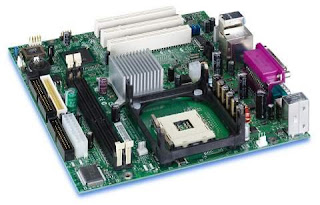

Most home users don't have a real reason to care about which processor. How fast is fast? It is when the user gets into the business of needing lots of power that it makes a difference. Having to have the latest and greatest is not the correct thing for everyone. If you are a gamer, faster is better. If you are emailing the kids every morning, it doesn't make much difference. So based on ur needs u do need to understand the wich processor is best for ur comp and why.
But take the other case. If we go off the assumption that we are classifying "home users" as someone that does minimal email, minimal web browsing, minimal everything. The problem is that as the "home user" gets comfortable using a computer (email, web browsing, etc), they will start to explore using other things like YouTube, MySpace, iTunes, video games, digital cameras, etc. So where once their Celeron processor was fine doing what they wanted, now the "home user" is asking the processor to do things that really a Core Duo should be handling.
While a processor doesn't make the entire computer, it is the cornerstone of the computer and defines what else should be put into the computer. One shudn't attempt to put a nVidia 8800 video card and 4 GB of ram with a celeron processor and also not attempt to put 256 MB of Ram and On-board video with a Quad Core processor. But that doesnt mean one shud buy the cheapest processor/computer to fit their's needs. Since most "home users" might increase their computer usage, they want to see that computer they bought that fit their needs 3-6 months ago become obsolete because they are trying to do too much now. So wat needs to be really emphasized is to buy as much (processor) you can afford. Everything else (drives, memory, monitor, peripherals) can easily be upgraded, but you might be stuck with the wrong/old processor if you go on the cheap.
Wednesday, March 26, 2008
My conclusions at the end of this project
The primary focus that I had undertaken in my project was to assay the MIMO system over AWGN and Rayleigh to mitigate MAI. The channel model was built on the classical understanding of fading, Doppler spread and delay spread. The transmitted signal is assumed to be corrupted by multipath and MAI, in accession to AWGN at the front end of the receiver. As anticipated, the system is interference limited. It is discerned that the Multi User Detection employing linear and non linear detection techniques at the receiver can exterminate MAI and intra-cell interferences. Investigations of the simulation results reveal that Multi User Detection can ameliorate the capacity of the MIMO channels for coded signals. It is also seen that each technique is preferred for particular environments based on the complexity of the technique. It was seen that ML was the optimum method but MAP with ZF provided the same performance as ML. Also it was seen that though ML had low complexity than MAP for less number of antennas the complexity increased linearly with increase in antennas.
It was found out that in case error control coding techniques like Low Density Parity Check (LDPC) and Turbo Codes had been employed in this work the robustness of the MIMO communication system would have been improved. But due to constraint on the time we were not able to do further research on the same. Anyhow since this is an emerging field it can be envisioned that as future mobile communication especially 4G will be employing beamforming technique, this can also be considered as additional work.
It was found out that in case error control coding techniques like Low Density Parity Check (LDPC) and Turbo Codes had been employed in this work the robustness of the MIMO communication system would have been improved. But due to constraint on the time we were not able to do further research on the same. Anyhow since this is an emerging field it can be envisioned that as future mobile communication especially 4G will be employing beamforming technique, this can also be considered as additional work.
Monday, March 24, 2008
Now for the Various Techniques...
**ZF-This is an equalization technique in which the received signal is multiplied by a weighted vector such that the Inter Symbol Interference (ISI) is forced to zero. This value is chosen from the Channel Matrix (H) which provides the channel state information. The disadvantage in Zf is that since it amplifies the noise components along with he signal it is not much preferred.
**MMSE-The MMSE receiver suppresses both the interference and noise components, whereas the ZF receiver removes only the interference components. This implies that the mean square error between the transmitted symbols and the estimate of the receiver is minimized. Hence, MMSE is superior to ZF in the presence of noise.
**MAP-This algorithm is used to obtain a point estimate of an unobserved quantity on the basis of empirical data. It is optimum as it minimizes the probability of error. MAP instead of selecting the next symbol to be detected according to the rule, here the set of all potential symbol decisions are ranked with respect to their a posteriori probabilities of being correct. The index permutation produced by MAP depends on both H (Channel Matrix) and r(received signal) , unlike ZF where permutation depends only on H . So the major complexity in MAP is that the weighting vector must be computed in real time since it also depends on r.
**ML-It brings out the optimal performance. It is a special case of MAP detection when all possible inputs are equally likely. The major advantage of ML over MAP is that the likelihood is easily computed for each possible symbol knowing the statistics of noise generator and not statistics of data symbol. ML and MAP are different detection techniques, but yield the same result when the priori probabilities are equal. However If priori probabilities are different, MAP yields lower probability of error.
**N/C-Nulling and cancelling (NC) uses a serial decision-feedback approach to detect each layer separately. When a layer has been detected, an estimate of the corresponding contribution to the received vector r is subtracted from; the result is then used to detect the next layer and so on. N/C progressively clears r from the interference corresponding to the layers already detected. To detect a specific layer, the layers that have not been detected yet are “nulled out” (equalized) according to the ZF or MMSE approach. Error propagation can be a problem because incorrect data decisions actually increase the interference when detecting subsequent layers. Thus, the order in which the layers are detected strongly influences the performance of NC.
**MMSE-The MMSE receiver suppresses both the interference and noise components, whereas the ZF receiver removes only the interference components. This implies that the mean square error between the transmitted symbols and the estimate of the receiver is minimized. Hence, MMSE is superior to ZF in the presence of noise.
**MAP-This algorithm is used to obtain a point estimate of an unobserved quantity on the basis of empirical data. It is optimum as it minimizes the probability of error. MAP instead of selecting the next symbol to be detected according to the rule, here the set of all potential symbol decisions are ranked with respect to their a posteriori probabilities of being correct. The index permutation produced by MAP depends on both H (Channel Matrix) and r(received signal) , unlike ZF where permutation depends only on H . So the major complexity in MAP is that the weighting vector must be computed in real time since it also depends on r.
**ML-It brings out the optimal performance. It is a special case of MAP detection when all possible inputs are equally likely. The major advantage of ML over MAP is that the likelihood is easily computed for each possible symbol knowing the statistics of noise generator and not statistics of data symbol. ML and MAP are different detection techniques, but yield the same result when the priori probabilities are equal. However If priori probabilities are different, MAP yields lower probability of error.
**N/C-Nulling and cancelling (NC) uses a serial decision-feedback approach to detect each layer separately. When a layer has been detected, an estimate of the corresponding contribution to the received vector r is subtracted from; the result is then used to detect the next layer and so on. N/C progressively clears r from the interference corresponding to the layers already detected. To detect a specific layer, the layers that have not been detected yet are “nulled out” (equalized) according to the ZF or MMSE approach. Error propagation can be a problem because incorrect data decisions actually increase the interference when detecting subsequent layers. Thus, the order in which the layers are detected strongly influences the performance of NC.
Multi User Detecion
Here I come to the main portion of my project...The evaluation for various detectors and finding the optimal one. First once more on MUD.
The use of multiple antennas at the transmitter and receiver results in Multiple Access Interference (MAI). Delay spread causes Inter-Symbol Interference (ISI). ISI can cause an irreducible error floor when the modulation symbol time is on the same order as the channel delay spread. Equalization defines any signal processing technique used at the receiver to alleviate the ISI problem caused by delay spread.Equalization techniques fall into two broad categories: linear and nonlinear. The linear techniques are generally the simplest to implement and to understand conceptually. However, they typically suffer from more noise enhancement than nonlinear equalizers, and are therefore not used in most wireless applications. We had considered Zero Forcing (ZF), Mean Square Error (MMSE) and Maximum a Posteriori (MAP) under linear equalizers and Nulling/Cancelaltion (N/C) and Maximum Likelihood (ML) under non-linear methods. Now to see them one by one.
The use of multiple antennas at the transmitter and receiver results in Multiple Access Interference (MAI). Delay spread causes Inter-Symbol Interference (ISI). ISI can cause an irreducible error floor when the modulation symbol time is on the same order as the channel delay spread. Equalization defines any signal processing technique used at the receiver to alleviate the ISI problem caused by delay spread.Equalization techniques fall into two broad categories: linear and nonlinear. The linear techniques are generally the simplest to implement and to understand conceptually. However, they typically suffer from more noise enhancement than nonlinear equalizers, and are therefore not used in most wireless applications. We had considered Zero Forcing (ZF), Mean Square Error (MMSE) and Maximum a Posteriori (MAP) under linear equalizers and Nulling/Cancelaltion (N/C) and Maximum Likelihood (ML) under non-linear methods. Now to see them one by one.
Sunday, March 23, 2008
Employing MIMO
The use of multiple antennas at the transmitter and receiver in wireless systems, popularly known as MIMO (multiple input multiple output) technology, has rapidly gained in popularity over the past decade due to its powerful performance enhancing capabilities. It offers a number of benefits that enables to meet the challenges posed by both the resource constraints and the impairments in wireless communication. In addition to the time and frequency dimension that are exploited in single-antenna system, multiple antennas exploit spatial dimension. Over the past few years, it has been shown that using multiple antennas can significantly increase the capacity and robustness of communication systems in fading environments. Capacity grows with the number of antennas used.
To achieve the capacities promised using MIMO scheme Bell Labs proposed an architecture known as Bell Labs Space Time (BLAST) architecture. To overcome the implementation complexities modified version known as Vertical Bell Labs Space Time or VBLAST was proposed. In this architecture a single data stream is demultiplexed into M sub streams, and each sub stream is then encoded into symbols and fed to its respective transmitter. It is assumed that the same constellation is used for each sub stream and that the transmissions are organized into bursts of L symbols. The rich scattering environment that is considered is rayleigh fading channel characterized by weak LoS and strong scatterers. At the receiver side each antenna receives signals from all the transmitters and the various versions of the signal are combined, then estimated and decoded to get the symbol.
To achieve the capacities promised using MIMO scheme Bell Labs proposed an architecture known as Bell Labs Space Time (BLAST) architecture. To overcome the implementation complexities modified version known as Vertical Bell Labs Space Time or VBLAST was proposed.
 In this architecture a single data stream is demultiplexed into M sub streams, and each sub stream is then encoded into symbols and fed to its respective transmitter. It is assumed that the same constellation is used for each sub stream and that the transmissions are organized into bursts of L symbols. The rich scattering environment that is considered is rayleigh fading channel characterized by weak LoS and strong scatterers. At the receiver side each antenna receives signals from all the transmitters and the various versions of the signal are combined, then estimated and decoded to get the symbol.
Space Time Block Codes
Well i had talked abt us using coded signals. That brings us to Space Time codes. These are used at the transmitter to exploit the spatial domain, which means while the time, frequency remains the same the code alone differs for the different systems. This is analogous to CDMA technology but the difference lies in that while CDMA employs single channel in this multiple channels are realized.So here i give a gist on Space Time Block codes.
STBC is an extension of transmit diversty. Here at one instant of time the data is sent via the separate antennas by coding them using orthogonal codes. STBC is a generalization of Alamouti's code discovered by Alamouti for transmission using two transmitting antennas. The scheme can be described as below:
The information bits are first modulated using an M-ary modulation scheme. The encoder then takes a block of two modulated symbols s1 and s2 in each encoding operation and gives it to the transmit antennas according to the code matrix,
S=[s1 -s2* ; s2 s1*]
The first column represents the first transmission period and the second column the second transmission period. The first row corresponds to the symbols transmitted from the first antenna and the second row corresponds to the symbols transmitted from the second antenna. This implies that we are transmitting both in space (across two antennas) and time (two transmission intervals). This is space-time coding. By extending this to more than 2 antennas the theory behind STBC was formulated.
At the receiver side these various versions are combined and estimated. Then this value is sent to the maximum likelihood detector that minimizes the decision metric and decodes the symbols s1 and s2.
STBC is an extension of transmit diversty. Here at one instant of time the data is sent via the separate antennas by coding them using orthogonal codes. STBC is a generalization of Alamouti's code discovered by Alamouti for transmission using two transmitting antennas. The scheme can be described as below:
The information bits are first modulated using an M-ary modulation scheme. The encoder then takes a block of two modulated symbols s1 and s2 in each encoding operation and gives it to the transmit antennas according to the code matrix,
S=[s1 -s2* ; s2 s1*]
The first column represents the first transmission period and the second column the second transmission period. The first row corresponds to the symbols transmitted from the first antenna and the second row corresponds to the symbols transmitted from the second antenna. This implies that we are transmitting both in space (across two antennas) and time (two transmission intervals). This is space-time coding. By extending this to more than 2 antennas the theory behind STBC was formulated.
At the receiver side these various versions are combined and estimated. Then this value is sent to the maximum likelihood detector that minimizes the decision metric and decodes the symbols s1 and s2.
Saturday, March 22, 2008
In simple terms...First MUD
I no the prev msg had lines that cud not be comprehended in one read. In fact it cant be comprehended after many reads also cos it has many terms. So here i provide an easier explanation for each term employed.
First what is Multi-User Detection (MUD)?
Any multi user communication system is inherently interference limited. With the increase in number of users, interference between the users known as Multiple Access Interference or MAI swells, severely hindering the system capacity. Therefore there exist a need for an efficient algorithm that will cancel, limit, avoid or reduce interference. In the case of Conventional receivers (eg. matched filter) the received signals from other users are treated as noise and are decoded independently. However, since signals from other users are also required for decoding at the base station, estimates of signals from other users can be used to estimate the interference and cancel it from the desired signal. This leads to the concept called Multi-User Detection (MUD).
First what is Multi-User Detection (MUD)?
Any multi user communication system is inherently interference limited. With the increase in number of users, interference between the users known as Multiple Access Interference or MAI swells, severely hindering the system capacity. Therefore there exist a need for an efficient algorithm that will cancel, limit, avoid or reduce interference. In the case of Conventional receivers (eg. matched filter) the received signals from other users are treated as noise and are decoded independently. However, since signals from other users are also required for decoding at the base station, estimates of signals from other users can be used to estimate the interference and cancel it from the desired signal. This leads to the concept called Multi-User Detection (MUD).
Friday, March 21, 2008
Performance Evaluation of Multi-Stage Receivers for coded signals in MIMO channels
The abstract can be given as below:
Wireless Communication is one of the most vibrant areas in the communication field today. The past decade has seen a surge of research activities in the area, especially in designing faster, more reliable and power efficient wireless communication system. As a novel technology, multi-antenna communication especially MIMO system has gained lot of interest and has been considered as a key technology for Broadband 3G communication. By exploiting the spatial diversity using multiple antennas one can improve reliability, increase throughput and reduce transmission power. The performance on the uplink degrades as the interference swells. The main objective of this thesis is to propound interference cancellation technique called Multi-User Detection (MUD) to mitigate the effects of Multiple Access Interference (MAI), which limits the capacity of the system. The performance of various Multi-User receivers for VBLAST and STBC are studied and analyzed. Also the performance comparison of sub-optimal detectors such as Zero Forcing (ZF), Minimum Mean Square Error (MMSE), QR Factorization, Nulling and Cancellation Detector, Zero Forcing/Maximum A Posteriori (ZF/MAP) and optimal detectors like Maximum Likelihood (ML) are assayed through simulation. It is discerned that MUD provides remarkable amelioration in terms of mitigating MAI for coded signals on MIMO channels.
Wireless Communication is one of the most vibrant areas in the communication field today. The past decade has seen a surge of research activities in the area, especially in designing faster, more reliable and power efficient wireless communication system. As a novel technology, multi-antenna communication especially MIMO system has gained lot of interest and has been considered as a key technology for Broadband 3G communication. By exploiting the spatial diversity using multiple antennas one can improve reliability, increase throughput and reduce transmission power. The performance on the uplink degrades as the interference swells. The main objective of this thesis is to propound interference cancellation technique called Multi-User Detection (MUD) to mitigate the effects of Multiple Access Interference (MAI), which limits the capacity of the system. The performance of various Multi-User receivers for VBLAST and STBC are studied and analyzed. Also the performance comparison of sub-optimal detectors such as Zero Forcing (ZF), Minimum Mean Square Error (MMSE), QR Factorization, Nulling and Cancellation Detector, Zero Forcing/Maximum A Posteriori (ZF/MAP) and optimal detectors like Maximum Likelihood (ML) are assayed through simulation. It is discerned that MUD provides remarkable amelioration in terms of mitigating MAI for coded signals on MIMO channels.
Thursday, March 20, 2008
Hav u heard abt MIMO ?
Now that i did say im busy with my project thot that i mite as well write a bit abt wat it is all abt...not the entire cos it will be too much in one gulp. I'll give an intro. So here goes...
Have u heard of 2G mobiles. Well all of us were using them once upon a time. Its nothing but the first model mobiles all of us had, some even have now...the most familiar among it being the nokia 1100....ok so wat abt 2.5G...that includes a mobile enabled with GPRS. So is that the final one. Come on technology is ever evolving, will it stop with 2.5G. So we have the 3G mobiles. Now wat falls under that. Simple its the CDMA technology we all now, thats now implemented in India. So where do i come? Im researching in 4G communication. Know wat that means. Im into research and thats wer MIMO comes. Multi Input Multi Output deals with having multiple antennas at the transmitter and receiver. I cant make it more simpler. And my project is on the performance evaluation of these systems with more concentration on the receiver side. Im dealing with multistage receivers and using coded signals. We use Space Time Block Codes to code the signals and 2 stages of receivers are considered- Nulling and Cancellation. I guess this is more than enough terms for the first portion. More to come...Wait n watch.
Have u heard of 2G mobiles. Well all of us were using them once upon a time. Its nothing but the first model mobiles all of us had, some even have now...the most familiar among it being the nokia 1100....ok so wat abt 2.5G...that includes a mobile enabled with GPRS. So is that the final one. Come on technology is ever evolving, will it stop with 2.5G. So we have the 3G mobiles. Now wat falls under that. Simple its the CDMA technology we all now, thats now implemented in India. So where do i come? Im researching in 4G communication. Know wat that means. Im into research and thats wer MIMO comes. Multi Input Multi Output deals with having multiple antennas at the transmitter and receiver. I cant make it more simpler. And my project is on the performance evaluation of these systems with more concentration on the receiver side. Im dealing with multistage receivers and using coded signals. We use Space Time Block Codes to code the signals and 2 stages of receivers are considered- Nulling and Cancellation. I guess this is more than enough terms for the first portion. More to come...Wait n watch.
Friday, February 1, 2008
What are the differences in today's camcorders?
One might say that this is the best of times and the worst of times for making a decision regarding a video camera. There are many choices from which to select and making a good long-term selection can be difficult.
There are two major issues with which to contend regarding the actual video camera: (1) storage format, and (2) standard definition (SD) or high definition (HD). I'm going to address the latter first as I think it is an easier decision.
There are a handful of high-def video cameras on the market these days. While watching your home movies in HD on your HD t.v. must be very exciting you may run into a problem if you want to create (i.e. capture, edit and burn to DVD) home movies from your recordings. It is my understanding that there remains little in the way of available software for working with high-def home video recordings (at least where the software can work directly with your footage - some software will allow you to work with your footage, but only after transcoding to a different format, which inevitably degrades the quality of the video). This may not be as true today as it was last year, but from what is being seen around the web, the hardware is there, but software has lagged behind. If you are interested in the creative process of making home movies this may prove to be a problem. However, if you simply want to record movies and then watch them (directly) on your television, then go HD if you want to spend the money.
The more complicated issue is the one of to which media format you wish to record your movies. Currently the big three are Mini-DV tape, direct to DVD, and hard-drive-based units. There are some flash-memory type cameras on the market, but at this time I would, again, in my own opinion, steer clear of this option due to it's lack of recording time and video quality. Each of the big three has its own advantages and disadvantages, but it is how you will use your camera that may best determine the more appropriate route for you. That said....
While Mini-DV is the older technology here I still firmly believe it's the best all-round choice for the average consumer. First, the technology is tried-and-true. Second, Mini-DV tapes are rather inexpensive (especially when bought in bulk at a place like Costco or Sam's). Third, while they take a while to download ('capture') onto your computer, there is plenty of software available for editing if that is a direction in which you are currently engaged or think you would like to go. Fourth, they offer a very high-quality image and use a minimum amount of compression. Finally, you can save the tape for long-term storage as it remains quite stable over long periods of time if you take just a modicum of care of the tape.
Direct-to-DVD appears to be a system that is geared towards instant gratification. You can shoot your video and then take your DVD (actually it's a mini-DVD; not a full-sized one) to your computer or stand-alone DVD player and watch it on your monitor or television. It couldn't be simpler. This format works very well if you have no intention of making home movies (avoiding that creative process), but this method comes with a price: video quality. There isn't a whole lot of room on an unused mini DVD. If you elect to capture video using less compression you will have less recording time. If you opt to increase compression you will obtain longer recording times, but the video quality will diminish. This will become even more apparent if you watch your video on a large screen television where compression artifacts will become much more apparent. In addition, the cost of mini DVDs is more than that of mini-DV tapes by a fair margin.
Finally, there is the latest incarnation of media - the well-known hard drive. Hard-drive based camcorders appear to be the wave of the future based upon how many can be seen at the local consumer electronics stores as well as by what is seen in the press and on the Internet. This isn't necessarily a bad thing either as a hard-drive based camcorder seems to bridge the gap between mini-DV tape and mini-DVD based camcorders. With a sufficiently sized hard drive you should be able to record long movies without the need for much in the way of compression, thus offering you good (if not great) quality video as well as long recording times. Transferring your videos to your computer should also be quick, but keep in mind that large video files still take time to transfer. However, you are no longer tied to the 1:1 time ratio when moving video from mini-DV tape to your computer so things will be much quicker than if you purchased a tape-based camcorder.
They only down-side that I can see with hard-drive based units is long-term reliability and I say this from the perspective of the hard-drive. Hard drives can be finicky. When they sit in your desktop PC there is no concern about motion (as opposed to a camcorder being moved while your video tape, dropped, etc.). There are no physical forces being exercised upon the drive other than those created by the drive itself (as it spins and the read/write heads move back and forth). Even laptops are reasonably safe for hard drives because most ppl aren't moving around their laptops while they work on them. A camcorder is a different story and might better be related to the mini hard drives that have been found for years in MP3 players. Both camcorders and MP3 players can receive quite a bit of shock when being moved about in the normal course of use. And even with all the physical and software-based things a company can do to help protect a hard-drive, it is still in an environment that is less than conducive to long-life and reliability (this may be why so many folks see what they perceive to be premature deaths in hard-drive based MP3 players). If you are considering the hard-drive route for a camcorder carefully consider under what circumstances and how often it will be used. Remember, the big professional video cameras used by the ppl at your local television station are tape-based and there is a reason they remain so: tried-and-true and long-term reliability.
There are two major issues with which to contend regarding the actual video camera: (1) storage format, and (2) standard definition (SD) or high definition (HD). I'm going to address the latter first as I think it is an easier decision.
There are a handful of high-def video cameras on the market these days. While watching your home movies in HD on your HD t.v. must be very exciting you may run into a problem if you want to create (i.e. capture, edit and burn to DVD) home movies from your recordings. It is my understanding that there remains little in the way of available software for working with high-def home video recordings (at least where the software can work directly with your footage - some software will allow you to work with your footage, but only after transcoding to a different format, which inevitably degrades the quality of the video). This may not be as true today as it was last year, but from what is being seen around the web, the hardware is there, but software has lagged behind. If you are interested in the creative process of making home movies this may prove to be a problem. However, if you simply want to record movies and then watch them (directly) on your television, then go HD if you want to spend the money.
The more complicated issue is the one of to which media format you wish to record your movies. Currently the big three are Mini-DV tape, direct to DVD, and hard-drive-based units. There are some flash-memory type cameras on the market, but at this time I would, again, in my own opinion, steer clear of this option due to it's lack of recording time and video quality. Each of the big three has its own advantages and disadvantages, but it is how you will use your camera that may best determine the more appropriate route for you. That said....
While Mini-DV is the older technology here I still firmly believe it's the best all-round choice for the average consumer. First, the technology is tried-and-true. Second, Mini-DV tapes are rather inexpensive (especially when bought in bulk at a place like Costco or Sam's). Third, while they take a while to download ('capture') onto your computer, there is plenty of software available for editing if that is a direction in which you are currently engaged or think you would like to go. Fourth, they offer a very high-quality image and use a minimum amount of compression. Finally, you can save the tape for long-term storage as it remains quite stable over long periods of time if you take just a modicum of care of the tape.
Direct-to-DVD appears to be a system that is geared towards instant gratification. You can shoot your video and then take your DVD (actually it's a mini-DVD; not a full-sized one) to your computer or stand-alone DVD player and watch it on your monitor or television. It couldn't be simpler. This format works very well if you have no intention of making home movies (avoiding that creative process), but this method comes with a price: video quality. There isn't a whole lot of room on an unused mini DVD. If you elect to capture video using less compression you will have less recording time. If you opt to increase compression you will obtain longer recording times, but the video quality will diminish. This will become even more apparent if you watch your video on a large screen television where compression artifacts will become much more apparent. In addition, the cost of mini DVDs is more than that of mini-DV tapes by a fair margin.
Finally, there is the latest incarnation of media - the well-known hard drive. Hard-drive based camcorders appear to be the wave of the future based upon how many can be seen at the local consumer electronics stores as well as by what is seen in the press and on the Internet. This isn't necessarily a bad thing either as a hard-drive based camcorder seems to bridge the gap between mini-DV tape and mini-DVD based camcorders. With a sufficiently sized hard drive you should be able to record long movies without the need for much in the way of compression, thus offering you good (if not great) quality video as well as long recording times. Transferring your videos to your computer should also be quick, but keep in mind that large video files still take time to transfer. However, you are no longer tied to the 1:1 time ratio when moving video from mini-DV tape to your computer so things will be much quicker than if you purchased a tape-based camcorder.
They only down-side that I can see with hard-drive based units is long-term reliability and I say this from the perspective of the hard-drive. Hard drives can be finicky. When they sit in your desktop PC there is no concern about motion (as opposed to a camcorder being moved while your video tape, dropped, etc.). There are no physical forces being exercised upon the drive other than those created by the drive itself (as it spins and the read/write heads move back and forth). Even laptops are reasonably safe for hard drives because most ppl aren't moving around their laptops while they work on them. A camcorder is a different story and might better be related to the mini hard drives that have been found for years in MP3 players. Both camcorders and MP3 players can receive quite a bit of shock when being moved about in the normal course of use. And even with all the physical and software-based things a company can do to help protect a hard-drive, it is still in an environment that is less than conducive to long-life and reliability (this may be why so many folks see what they perceive to be premature deaths in hard-drive based MP3 players). If you are considering the hard-drive route for a camcorder carefully consider under what circumstances and how often it will be used. Remember, the big professional video cameras used by the ppl at your local television station are tape-based and there is a reason they remain so: tried-and-true and long-term reliability.
Subscribe to:
Posts (Atom)